
Shine Forms runs on Windows and you can find our system requirements here.
If you want to use Shine Forms on a Mac, you can do that using the fabulous Parallels to let you run Windows software on your Mac.
If you haven’t already bought a licence, then you can just go ahead with our free 30-day trial. To do that, just download and install Shine Forms and it will start your free 30-day, fully functional trial.
During the trial all the features of Shine Forms work as they will with a licensed version, but PDFs will carry a watermark. If you later purchase a licence then that watermark will be removed from any certificates you have created during the trial.
To start your free 30-day trial just click the link below to download the latest installer.
www.shineforms.co.uk/download/latest
The free trial window
Each time Shine Forms starts during the trial, the free trial window shows how many days of the trial are left and the day it ends:
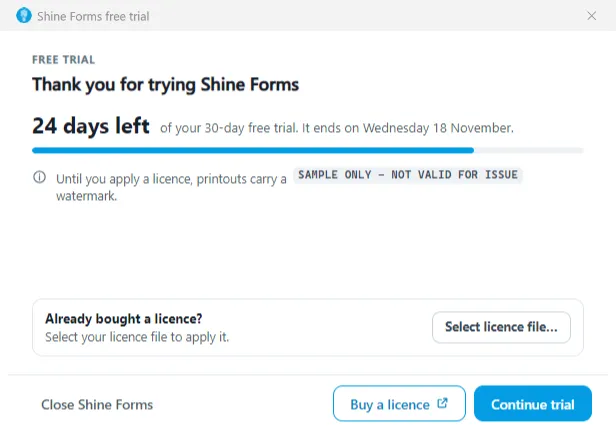
- Continue trial carries on with the trial.
- Buy a licence opens our online store in your browser. The window stays open.
- Select licence file… applies a licence you have bought. If the file can’t be used, the window says why. Once it is applied, restart Shine Forms to start using your licence.
- Close Shine Forms closes Shine Forms.
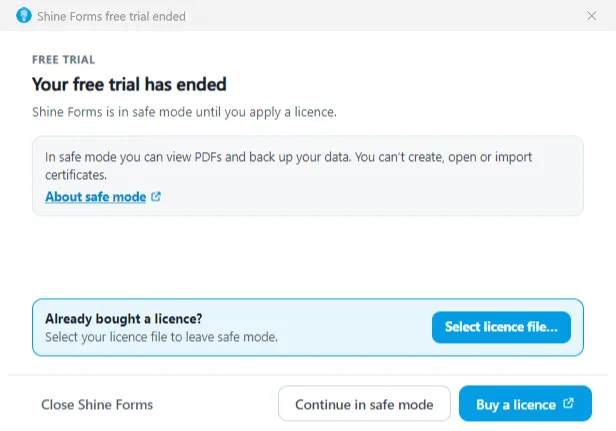
In the last seven days of the trial, the count turns amber, and red on the last day. When the trial has ended, the window says so and Shine Forms runs in safe mode until you apply a licence:
When you are ready to purchase a licence, you can read about doing that here.
Read more about using Shine Forms from our getting started page here: