
Introducing Circuit Helper: Smarter Circuit Reviews in Shine Forms
.png)
Understanding your electrical certificates and reports just got easier. Shine Forms new Circuit Helper feature brings circuit intelligence right where you need it—directly in your circuits and test results. Whether you’re entering values or reviewing completed work, the Circuit Helper makes it faster and more intuitive to see what Shine Forms intelligence is doing and why.
What is the Circuit Helper?
The Circuit Helper is a powerful new feature that displays Shine Forms intelligent circuit analysis directly alongside your circuit details. Instead of switching between your work and the Intelligence Manager, you can now see, understand, and act on intelligence statements right where you’re working.
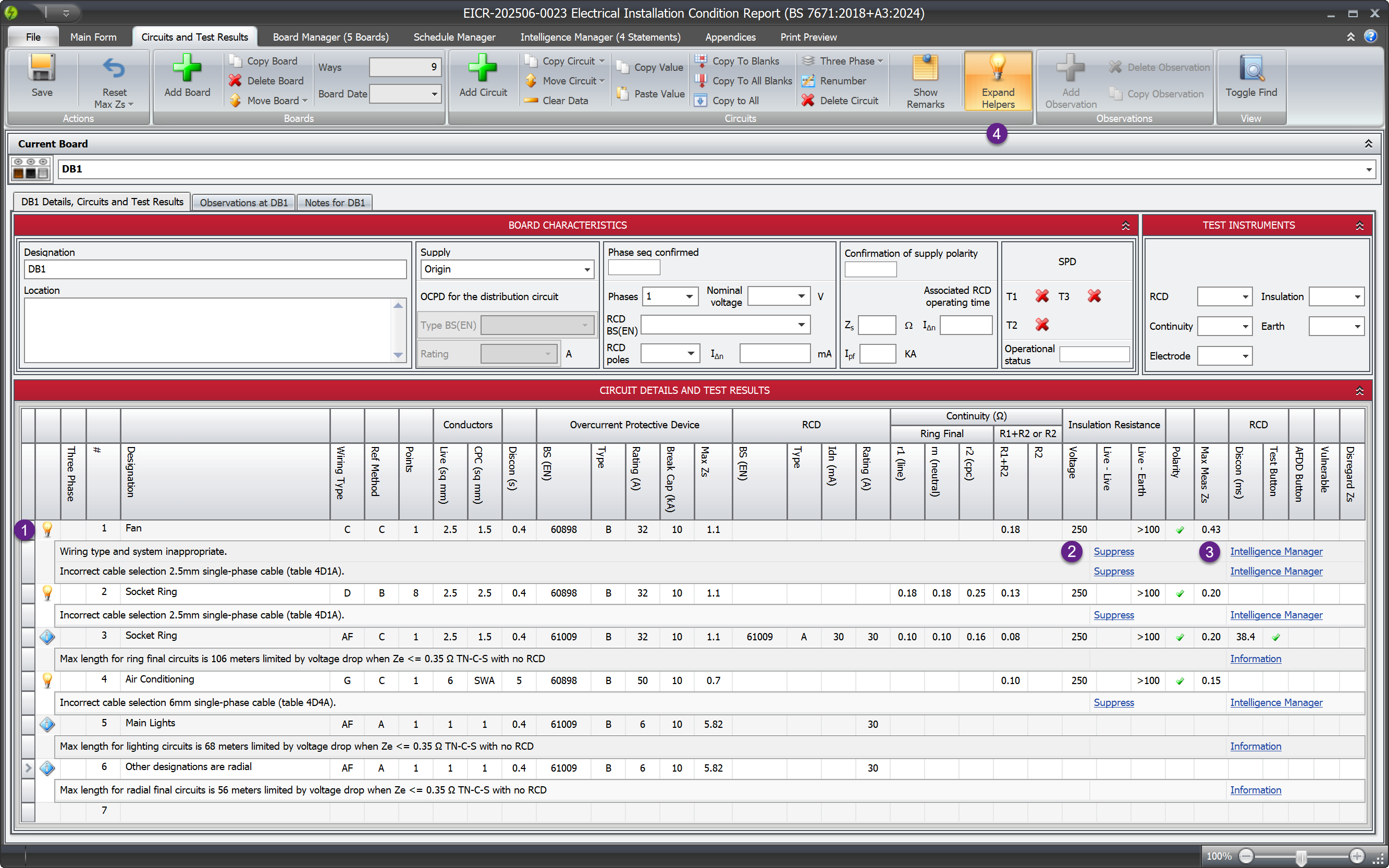
Key Features
Visual Indicators at a Glance
The Circuit Helper shows clear indicator icons next to each circuit (1 in the image above):
- Light bulb icon - Pirform has applied intelligence to this circuit
- Information icon - Important information is available about this circuit
- Instant toggle - toggle on or off by clicking the icon or using the ribbon (4 in the image above)
No more guessing whether Shine Forms has analysed a circuit—the indicators tell you immediately.
Inline Intelligence Details
Click any indicator icon to expand the details directly below the circuit. You’ll see:
- Intelligence statements - What Shine Forms has calculated or determined
- Quick actions - Suppress intelligence or navigate to the Intelligence Manager
- Important information - Like maximum circuit lengths for on-site guide compliance
Everything you need is right there, eliminating the need to switch between screens.
One-Click Actions
From the Circuit Helper, you can (2 & 3 in the image above):
- Suppress intelligence - Directly from the circuit, with one click
- Navigate to Intelligence Manager - Jump straight to detailed management
- View documentation - Access relevant help docs instantly
This streamlined workflow saves time and keeps you focused on the task at hand.
Expand All for Easy Reviewing
When reviewing or checking work, click the Expand Helpers button in the ribbon to automatically expand all Circuit Helpers throughout the certificate. As you navigate through boards, you’ll see all intelligence and information at once—perfect for QA reviews or final checks before submitting certificates.
Why Circuit Helper Matters
For On-Site Work
When you’re working on-site, every second counts. The Circuit Helper lets you:
- Quickly verify Shine Forms calculations without leaving the circuit
- Spot issues or intelligence applications immediately
- Make informed decisions about suppressing or accepting intelligence
For Office Reviews
When reviewing certificates back at the office:
- Use Expand Helpers to see all intelligence at once
- Quickly identify circuits that need attention
- Streamline your QA process with visual indicators
For Training New Team Members
The Circuit Helper makes it easier to train new engineers:
- They can see exactly what Shine Forms is doing and why
- Inline explanations help build understanding
- Visual feedback reinforces learning
How It Works with Pirform’s Intelligence
The Circuit Helper integrates seamlessly with Shine Forms existing intelligence features:
- Cable sizing automation - See the results right in the circuit
- Earthing conductor selection - Understand why Shine Forms chose a particular size
- RCD operation - View compliance checks inline
- Ring circuit validation - See maximum lengths for on-site guide compliance
- Schedule items - Understand automatic schedule item generation
Learn more about how Shine Forms intelligence works in our documentation.
Getting Started
The Circuit Helper is available in Shine Forms 2025.4 and later. It’s automatically enabled—just look for the indicator icons next to your circuits.
Tips for Using Circuit Helper
- Start with Expand Helpers - When reviewing work, click Expand Helpers first to see everything at once
- Click for details - When entering data, click indicators as you go to understand what Pirform is doing
- Use quick actions - Don’t navigate away—suppress or manage intelligence right from the circuit
- Check information icons - These often contain helpful guidance like maximum circuit lengths
What’s Next?
The Circuit Helper is just the beginning of making Pirform more intuitive and informative. We’re continually improving how Pirform communicates its intelligence to help you work more efficiently and confidently.
Related Features
Want to dive deeper into Shine Forms capabilities? Check out these related topics:
- Shine Forms Intelligence System - How automatic calculations work
- Ring Circuit Intelligence - IET On-Site Guide compliance
- Working with Boards and Circuits - General circuit management
Learn More
Ready to see the Circuit Helper in action? Visit our detailed documentation on Circuit Helper to learn about all its features and capabilities.
Have questions or feedback about the Circuit Helper? We’d love to hear from you—contact our support team or join the conversation on our community forums.