---
title: "Shine Forms 2022.2 Pre-Release"
description: ""
date: 2022-08-29T00:00:00.000Z
author: "Shine Forms Team"
category: "Release Notes"
tags:
- "Shine Forms"
draft: false
---
📢
This post talks about a pre-release version of Shine Forms and focuses on technical changes to the software.
Shine Forms 2022.2 is a major release of Shine Forms and brings some significant changes. The highlights are:
- BS 7671:2018+A2:2022 (the "brown book") electrical forms.
- EICR inspection schedules can be fully customised.
- Significant under-the-hood changes.
We're putting the final touches to this release now and we're making a pre-release version available for testing and early adopters. There are instructions below for how to access this.
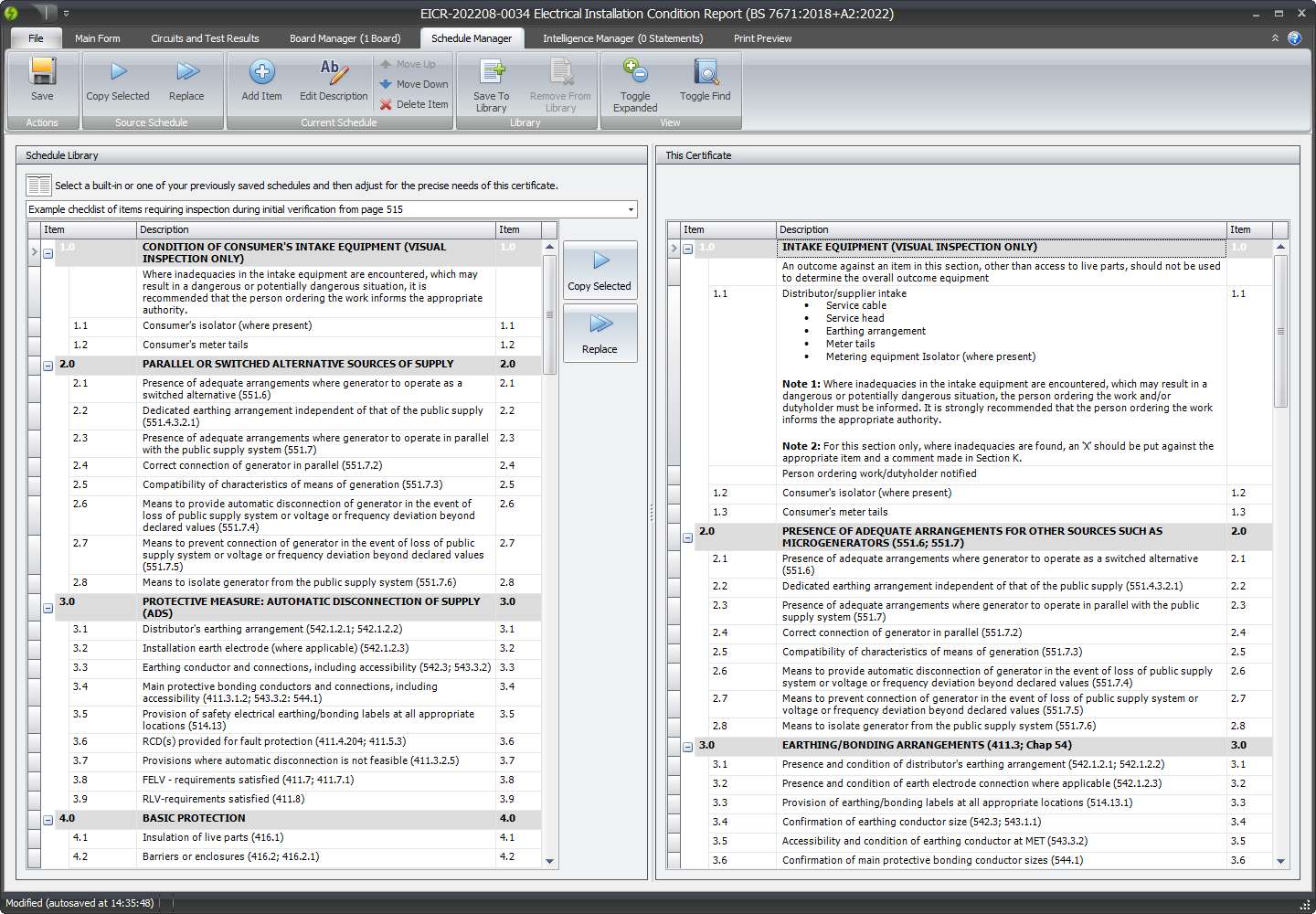 The non-technical changes are mainly around adding the new forms for the new amendment, BS 7671:2018+A2:2022. We have also added the ability to customise and resue inspection schedules in your EICRs. You can read about the new schedule management features in our documentation here:
[https://docs.shineforms.co.uk/pirform/schedule-manager/](https://docs.shineforms.co.uk/pirform/schedule-manager/)
The rest of this post will focus on the technical changes to the software. These changes fall into two categories:
- Updated to the latest version of [Microsoft .Net](https://dotnet.microsoft.com/).
- Updated the database to a new format.
# No-dependency installation
Previous versions of Shine Forms used to run a separate installer to install earlier versions of the .Net Framework. Now we have moved to .Net 6 we now ship everything that is needed to run Shine Forms the main installer.
The benefits of this are reduced dependencies and easier management.
The downside of this is that the installer is larger to download - coming in at around 140 MB as opposed to the previous 70 MB.
# Shine Forms is now faster
The new changes have made Shine Forms faster to start up, faster to open certificates, and backup files are now smaller.
# Significantly faster automatic backups
Previously, the auto backup took a full backup when closing Shine Forms after changes had been made. This could take a long time, especially for customers with many certificates.
We have changed the auto backup to take an incremental backup to a folder which has drastically reduced the time to take the backup (although the first backup will still take a little while).
# The Shine Forms database upgrade from 2022.1 to 2022.2
The non-technical changes are mainly around adding the new forms for the new amendment, BS 7671:2018+A2:2022. We have also added the ability to customise and resue inspection schedules in your EICRs. You can read about the new schedule management features in our documentation here:
[https://docs.shineforms.co.uk/pirform/schedule-manager/](https://docs.shineforms.co.uk/pirform/schedule-manager/)
The rest of this post will focus on the technical changes to the software. These changes fall into two categories:
- Updated to the latest version of [Microsoft .Net](https://dotnet.microsoft.com/).
- Updated the database to a new format.
# No-dependency installation
Previous versions of Shine Forms used to run a separate installer to install earlier versions of the .Net Framework. Now we have moved to .Net 6 we now ship everything that is needed to run Shine Forms the main installer.
The benefits of this are reduced dependencies and easier management.
The downside of this is that the installer is larger to download - coming in at around 140 MB as opposed to the previous 70 MB.
# Shine Forms is now faster
The new changes have made Shine Forms faster to start up, faster to open certificates, and backup files are now smaller.
# Significantly faster automatic backups
Previously, the auto backup took a full backup when closing Shine Forms after changes had been made. This could take a long time, especially for customers with many certificates.
We have changed the auto backup to take an incremental backup to a folder which has drastically reduced the time to take the backup (although the first backup will still take a little while).
# The Shine Forms database upgrade from 2022.1 to 2022.2
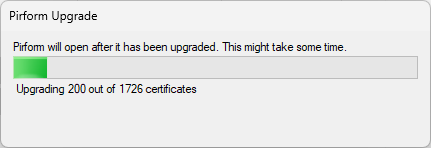 When Shine Forms 2022.2 or later runs for the first time, it checks whether there are any certificates from the older version of Shine Forms on the machine. If so, it will upgrade the certificates to the new database format. This process happens once and can take a few minutes to complete depending on the size of your Shine Forms database and speed of the target machine.
The previous certificate database remains in place and is not affected by the upgrade.
# Rolling back to Shine Forms 2022.1
Should you need to, you can just install Shine Forms 2022.1 and you will see your all your previous certificates are unchanged.
Contact [Shine Forms Support](mailto:support@shineforms.co.uk) if you need to re-run the database upgrade process.
# Other technical changes
We have removed support for the Windows Server 2003 due to the fact that it is no longer supported by Microsoft.
# Accessing the pre-release
There is a pre-release of the new version available for early testing. You can read how to access that in our documentation [here](https://docs.shineforms.co.uk/pirform/pre-release-versions/).
When Shine Forms 2022.2 or later runs for the first time, it checks whether there are any certificates from the older version of Shine Forms on the machine. If so, it will upgrade the certificates to the new database format. This process happens once and can take a few minutes to complete depending on the size of your Shine Forms database and speed of the target machine.
The previous certificate database remains in place and is not affected by the upgrade.
# Rolling back to Shine Forms 2022.1
Should you need to, you can just install Shine Forms 2022.1 and you will see your all your previous certificates are unchanged.
Contact [Shine Forms Support](mailto:support@shineforms.co.uk) if you need to re-run the database upgrade process.
# Other technical changes
We have removed support for the Windows Server 2003 due to the fact that it is no longer supported by Microsoft.
# Accessing the pre-release
There is a pre-release of the new version available for early testing. You can read how to access that in our documentation [here](https://docs.shineforms.co.uk/pirform/pre-release-versions/).